

Key Takeaways
Neon = pure Postgres with autoscaling, branching, and scale-to-zero; best if you want control and a composable stack.
Supabase = full backend (auth, storage, realtime, APIs); ideal for fast MVPs and minimal setup.
Migration is DB-easy (both Postgres) but app-hard: auth, RLS, realtime, and storage must be rebuilt when leaving Supabase.
TL;DR
Neon is a serverless Postgres database. It does one thing - Postgres - and does it really well. It can scale down to nothing when nobody's using it, and you can clone the whole database in seconds the way you fork a Git repo.
Supabase is a Firebase-style backend on top of Postgres. You get the database plus user logins, file uploads, real-time updates, and instant APIs - all in one bundle, all from one dashboard.
Choose Supabase if you want to ship a full app fast and you don't want to assemble five different services yourself.
Choose Neon if you want a great Postgres core and you already have (or want to choose) the rest of your stack on your own terms.
Migrating Supabase → Neon is doable, but it's not just "move the database." The schema and data move easily because both are vanilla Postgres. The hard part is rebuilding everything Supabase was doing on top - auth especially.
What is Neon?
Think of Neon as Postgres that goes to sleep when nobody's watching.
Here's the trick that makes Neon different from a normal Postgres database. In a traditional setup, you rent a server, Postgres runs on it, and that server is always on - even at 3 a.m. when nobody's using your app. You pay for that server 24/7 whether anyone's hitting it or not.
Neon splits the database into two layers. Your data lives in cheap, durable cloud storage (the kind of storage that's basically infinite and never goes away). The compute - the actual running Postgres process that answers queries - is separate, and Neon turns it off when nothing's happening. The moment a query comes in, compute boots back up, attaches to your data, and answers. Usually in under a second.
This split unlocks a few things you can't really get with traditional Postgres:
Branching. You can fork a database the same way you fork a Git repo. Make a branch, get a full copy of your schema and data, mess with it however you want - and it doesn't touch production. The clever part is that branches don't actually duplicate your data when you create them. They just point at the same underlying storage and only write new data when you change something. So a branch off a 50 GB production database costs you nothing in extra storage on day one. This sounds like a small thing until you realize it makes per-PR preview environments - which most teams give up on because they're too expensive - basically free.
Autoscaling. You set a minimum and maximum compute size, and Neon adjusts in between based on how busy the database is. Light traffic? It runs small and cheap. Sudden spike? It scales up.
Scale to zero. If nothing has hit the database in about five minutes, Neon turns off the compute entirely. No queries running means no compute bill. Your data is still there and safe; you're just not paying for an idle server.
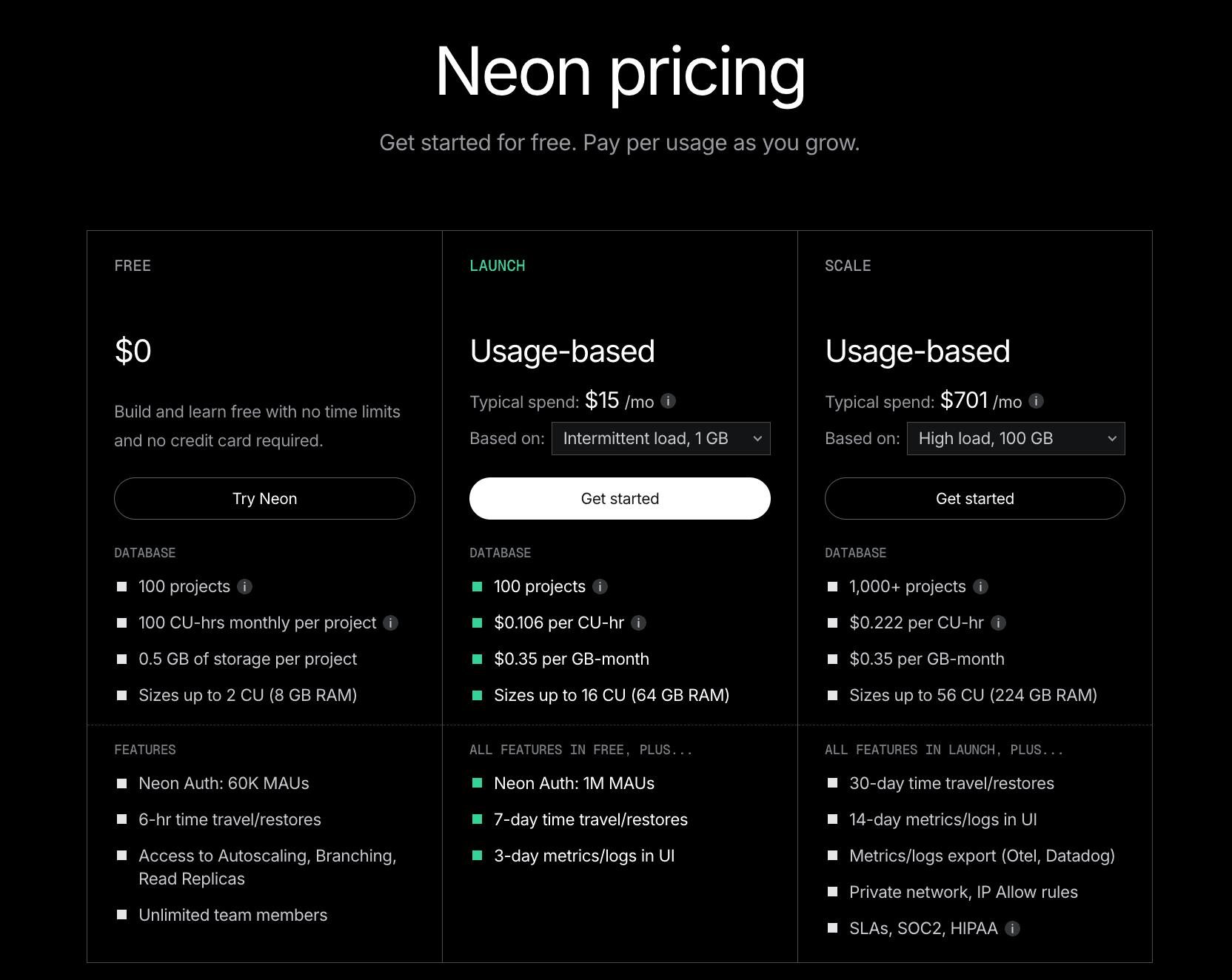
Databricks acquired Neon in May 2025. For users, the biggest impact was pricing: compute and storage costs dropped significantly, and the free tier expanded. As of 2026, the free plan includes around 100 compute hours per month per project and 0.5 GB of storage. Paid plans start at a $5/month minimum and are fully usage-based beyond that.
What "serverless Postgres" actually saves you
Two things, basically.
You stop guessing at capacity. With a traditional database, you have to pick an instance size up front. Too small and your app slows down under load. Too big and you're paying for headroom you never use. With Neon, you set a max and the database scales itself. You don't have to predict the future.
You stop paying for idle time. This matters more than people expect. Most B2B apps are dead quiet outside business hours. Most internal tools sit idle 22 hours a day. AI agents wake up, do their thing, and go back to sleep. If you're running a normal Postgres instance, you're paying full price the whole time. Neon just doesn't charge you for the silence.
There is one catch worth knowing about: cold starts. If your database has been fully asleep for a while and a query suddenly hits it, the database needs a moment to wake up - usually somewhere between 100 milliseconds and a second. For most apps, that's nothing. Nobody notices a one-second delay on a query that fires once an hour. But if your app has paths where every millisecond matters - checkout flows, login pages, real-time stuff - you'd just set a minimum compute size that's higher than zero, so the database never fully sleeps. You give up some scale-to-zero savings; you get rid of the cold starts entirely. It's a knob you can tune.
What is Supabase?
Imagine Firebase, but with a real database underneath instead of a weird NoSQL store.
That's basically the pitch. Supabase started as an open-source answer to Firebase - same easy "just sign up and start building" experience, but built on Postgres instead of Google's proprietary stuff. When you create a Supabase project, you don't just get a database. You get a whole stack:
Auth. User signups, logins, password resets, "sign in with Google," magic links, single sign-on for enterprises - all of it, handled. You don't have to build any of it yourself or sign up for a separate auth service.
Storage. Somewhere to put files - user avatars, PDFs, videos, whatever. Works like Amazon S3, but tied into your auth so "only this user can see these files" is a checkbox, not a project.
Realtime. This one's underrated. If you change a row in the database, Supabase can push that change to every connected client instantly, over a WebSocket. So building things like live dashboards, chat apps, collaborative editing, or "show me typing..." indicators becomes shockingly easy.
Auto-generated APIs. This is the magic trick. Point Supabase at your database, and every table automatically becomes a REST API. No backend code. Your frontend can just talk to the database directly, with permissions enforced at the database layer.
Edge Functions. Small chunks of serverless code (written in TypeScript, runs on Deno) for any logic that doesn't fit cleanly into SQL.
The whole point is that you can go from git init on a Friday night to "I have user accounts, file uploads, and a live-updating dashboard" by Sunday. For a solo developer or a tiny team, that's a massive head start.
One thing that's different from Neon, mechanically: Supabase Postgres doesn't scale to zero. You pick a compute size, and that compute runs continuously. Good news: zero cold starts, queries are always fast. Less good news: you're paying for compute every minute of every day, even when your app is asleep.
The 2026 numbers: the free tier gives you 500 MB of database, 1 GB of file storage, 50,000 monthly active users for auth, and up to 2 projects. Heads up though - free projects automatically pause if nobody touches them for 7 days. They wake up the moment you visit, but if you were planning to host an actual public app on the free tier, this rules it out. Pro starts at $25/month per organization (8 GB of database, 100K monthly users, 100 GB of file storage, $10 in compute credits included). Team is $599/month and adds the compliance stuff (SOC 2) and team-management features. Enterprise is "talk to us."
Neon vs Supabase: the differences that actually matter
One is a database. The other is a backend wearing a database.
If you remember nothing else from this post, remember that. Comparing Neon and Supabase only on "is this a good place to run Postgres" misses the entire reason teams pick one over the other. Here's the high-level picture:
Neon | Supabase | |
Database | ✅ Postgres | ✅ Postgres |
User logins / auth | ❌ Bring your own | ✅ Built in |
File storage | ❌ Bring your own (S3, etc.) | ✅ Built in |
Real-time updates | ❌ Bring your own | ✅ Built in |
Auto-generated APIs | ❌ Write them yourself | ✅ Built in |
Serverless functions | ❌ Bring your own | ✅ Edge Functions |
Database branching | ✅ First-class, copy-on-write | ⚠️ Basic preview branches |
Scale to zero | ✅ | ❌ Always-on |
Now the parts that need a bit of explaining:
Auth (handling user logins)
Neon doesn't do auth at all. If you need user accounts, you bring in something else - Auth0, Clerk, Cognito, WorkOS, or you build your own. The auth service handles passwords and sessions, then your app passes the user's identity into the database when it makes queries.
Supabase, on the other hand, treats auth as a first-class part of the platform. Sign-ups, logins, OAuth providers, magic links, password resets - all built in. The really clever bit is how it integrates with the database. You can write security rules at the database level that reference the logged-in user directly, like "users can only see their own rows." Supabase does this through a feature called row-level security (or RLS), and it's genuinely a great way to build a multi-user app without writing a bunch of permission-checking code in your backend.
The catch? Once your auth is wired up that tightly with Supabase, leaving the platform later means rebuilding it. Which is fine if you never plan to leave - but worth knowing.
Real-time updates
If you've ever wanted your app to update instantly when data changes - think Google Docs cursors, a Slack-like chat, a live dashboard - that's "real-time."
Neon doesn't have a built-in real-time feature. You have a few options if you need it: use Postgres's built-in LISTEN/NOTIFY for simple cases, set up logical replication if you're comfortable with that, or wire in a dedicated service like Pusher or Ably. None of this is hard, but it's all extra work.
Supabase Realtime, on the other hand, just works. Subscribe to a table from the client, and changes stream straight to the browser. If real-time is core to what you're building - anything collaborative, multiplayer, or "live" - this single feature can be reason enough to pick Supabase.
Storage (where files go)
When people say "storage" in this context, they mean file storage - images, videos, PDFs, user uploads. (Database storage is something else; both platforms handle that.)
Neon doesn't store files. You'd put them in Amazon S3, Cloudflare R2, Google Cloud Storage, or wherever - and then handle the auth and serving yourself.
Supabase includes file storage out of the box, integrated with the same auth and permission system as the database. That means you can define policies like “this user can read this file but not that one” using a unified access model.
The free tier includes around 1 GB of storage, with higher limits on paid plans.
One thing to watch: bandwidth costs. Once you exceed the included allowance, egress (data leaving Supabase) is billed at roughly $0.02 per GB, which can add up quickly for media-heavy applications.
Branching and environments
This is Neon's superpower. You can clone an entire database in seconds, do whatever you want with it, and throw it away when you're done - and it costs you almost nothing because the underlying data is shared until you change something.
What this enables, practically: every pull request can have its own preview environment with real-shaped data. Designers and product folks can click through the actual change. QA can test against realistic data instead of a sad seeded fake. AI experiments can run on production-like data without risking production.
Without Neon's kind of branching, this workflow is either really expensive (full database clones for every PR) or impossible (everyone shares one staging database and steps on each other's work). Most teams just give up and use a single shared staging database, which is fine until somebody runs a destructive migration.
Supabase has been adding preview-branch support, but it's narrower in scope and most teams there still operate with a small handful of long-lived environments - dev, staging, prod, that's it. If your workflow is built around lots of short-lived branches, Neon is the better fit by a wide margin.
How they charge you
This is the whole story, distilled.
Neon charges for what you actually use. Compute time, measured in hour-equivalents. Storage, measured in gigabytes. A few extras like point-in-time recovery and extra branches above your plan limit. If your database is busy 3 hours a day and asleep for 21, your bill reflects that.
Supabase charges for capacity. You pick a tier - Free, Pro, Team - and you get a bucket of compute, storage, users, and bandwidth. Overages are billed on top. Bills are predictable, which is nice when you need to forecast.
Neither is universally cheaper. The honest test is to model your traffic. If your database is mostly idle, Neon wins on cost. If you have steady, all-day traffic and you're getting real value out of Supabase's bundled auth, storage, and real-time, Supabase usually comes out ahead per-feature once you price out the equivalents.
When to choose Neon
Neon is the right call if any of these sound like you:
You already know your stack. You've got an opinion about which auth provider to use. You know where your files are going. You're not looking for a platform to make those decisions for you.
You care about ephemeral environments. Per-PR previews, per-feature branches, AI experiments on production-shaped data - and you want them to be cheap, not "we'll set this up next quarter" expensive.
Your traffic is bursty. AI agents that wake up and go back to sleep. Internal tools nobody uses on weekends. Batch jobs that run for an hour a day. Anything where the database is idle most of the time.
You want to keep things composable. You'd rather have ten small services that each do one thing well than one platform that does everything okay. You want to be able to swap out individual pieces without rewriting the world.
You have a real backend person. Someone who's comfortable picking and wiring up services.
Concrete example: a B2B SaaS where every pull request needs its own preview deployment, with its own database, seeded with anonymized production data. On Neon, that's a one-line script in CI - create a branch, point the preview at it, tear it down when the PR closes. On most other Postgres setups, that's a multi-week engineering project nobody has time for.
When to choose Supabase
Supabase is the right call if:
You're building an MVP and need to be live in a week, not a month. Speed of shipping is the only thing that matters right now.
Your team is frontend-leaning - or you're a solo founder, or a small agency, and "build a backend from scratch" is not where you want to spend your time.
Your app has standard SaaS shape. Users, roles, file uploads, dashboards, maybe some real-time updates. Nothing weird.
You'd rather configure auth in a dashboard than run an auth service.
Predictable bills matter to you more than usage-based optimization. You'd rather pay $25/month flat than spend an afternoon modeling out what compute hours will cost.
Concrete example: a community platform with profiles, comments, image uploads, and a live activity feed. With Supabase you can have all of that running in a single weekend. Doing the same on Neon means picking and wiring up an auth provider, an object store, and a real-time service - which gives you more flexibility, but also a lot more work for an app that may never need that flexibility.
Migration: Supabase → Neon
Moving the data is the easy part. Moving the auth is the part that humbles you.
Most teams don't migrate from Supabase to Neon for fun. There's usually a real reason: the bill is getting weird because you've got a lot of idle time, or you've outgrown the platform's defaults and want more control, or you're hitting limits and would rather scale Postgres directly. Sometimes all three.
The good news is that the database part is genuinely easy. Both Supabase and Neon are vanilla Postgres underneath, so pg_dump reads from one end and pg_restore writes into the other end and the data goes where you want.
The bad news is that most apps aren't using Supabase only as a database. If you're using Supabase Auth, your security rules almost certainly reference auth.uid() - a Supabase-specific helper function that doesn't exist on Neon. Every one of those policies needs a rewrite. If you're using Realtime, every part of your app that subscribes to live data needs a replacement. If you're using Storage, those files need to move to S3 or R2. The database is maybe a quarter of the work.
High-level flow
Here's the path most migrations follow:
Inventory what you're actually using. Database schema, extensions, every RLS policy, your auth config, Storage buckets, Realtime subscriptions, Edge Functions. Write it all down. This list is your migration spec.
Pick replacements for everything that isn't the database. Auth: Clerk, Auth0, WorkOS, Better Auth, or roll your own. Storage: S3, R2, GCS. Realtime: Pusher, Ably, your own WebSocket layer. Functions: whatever your app framework already does (Next.js routes, Cloudflare Workers, etc.).
Spin up Neon. Create a project. Create a migration branch (so you can blow it up and start over without losing anything). Import a schema-only dump first, just to make sure the schema is compatible.
Migrate the data. Full
pg_dumpfrom Supabase,pg_restoreinto Neon. For big databases, do an initial copy now and plan one final incremental sync at cut-over.Rewrite auth and RLS. This is the longest part of the project. Every reference to
auth.uid()needs to be replaced with however your new auth system passes user identity to the database (usually a JWT claim or a session variable).Update the app code. Everywhere your code calls
supabase.from(...),supabase.auth.*, orsupabase.storage.*, swap it out for direct database queries (Drizzle, Prisma, Kysely - whatever your team likes), the new auth SDK, and an S3 client.Test in staging. Full integration tests, load tests, exploratory clicking-around. Compare metrics against your Supabase baseline so you can tell if anything got slower.
Cut over. Final data sync during a maintenance window, switch the environment variables, watch the dashboards like a hawk, keep a rollback ready.
Don't want to do this alone? Migrations like this go 90% smoothly and 10% sideways at 2 a.m. - usually the auth and RLS part. If you'd rather have specialists handle it, CloseFuture does this work for product teams. Get in touch →
Step-by-step
1. Export from Supabase
pg_dump against your Supabase connection string is the move. A few patterns worth following:
Schema first, data second. Run
pg_dump --schema-onlyfirst and try to import it into Neon. If anything's incompatible, you find out in five minutes instead of after an eight-hour data export.Anonymize for non-prod. If you're going to use this dump to seed Neon branches for development or QA, scrub the personal info before you import it. It's much easier to do this once now than six times later.
Write down every extension and custom function. Anything Supabase added on top of base Postgres needs to be checked against what Neon supports.
2. Import into Neon
Create a Neon project. Create a dedicated branch for migration work (separate from your main branch, so you can experiment without anxiety). Use psql or pg_restore to load the dump.
Then validate:
Table counts match between Supabase and Neon.
Row counts match.
Indexes, constraints, and materialized views all came across.
A handful of representative queries run with reasonable performance.
If anything's broken, fix it on this branch and re-run. Branches are cheap. Iterate.
3. Replace Supabase Auth
This is the hardest and longest part of the migration. There are two reasonable paths.
Option A: move your users to a third-party auth provider like Clerk, Auth0, or WorkOS.
You export users from Supabase, import them into the new provider (most providers have migration endpoints that accept bcrypt password hashes - Supabase uses bcrypt, so this generally works without forcing users to reset their passwords), update your app to use the new SDK, and adjust your database security rules to reference the new user ID format (usually a JWT claim called sub).
Option B: roll your own auth on Neon.
You store users and sessions directly in your Postgres tables, issue your own JWTs (or session cookies, your choice), and lean on a library like Better Auth, Lucia, or Auth.js to handle the heavy lifting. More control, more responsibility.
Either way: run dual-auth in staging for a while. Have the new system running alongside Supabase, with Supabase still as the source of truth. Confirm sign-up, login, password reset, OAuth, and SSO all behave identically before you flip the switch.
4. Rewrite the security rules (RLS)
In a Supabase app, your security rules look like this:
create policy "users can read their own rows"
on profiles for select
using (auth.uid() = user_id);
That auth.uid() is a Supabase function. It doesn't exist on Neon. So on Neon, you need to pass the user's ID into the database yourself - usually as a session variable that your app sets at the start of each request:
-- in your app code, at the start of each request:
set local app.user_id = '<authenticated user id>';
-- the policy then reads it:
create policy "users can read their own rows"
on profiles for select
using (current_setting('app.user_id')::uuid = user_id);
There's a third option, by the way: move authorization out of SQL entirely and into your app code. Some teams find that easier to test and reason about. There's no universally right answer here - pick the one that fits how your team thinks.
Whichever path you take: audit every policy. Test every role. Use a Neon branch for this work specifically, so you can experiment without anxiety.
5. Update application code
Find every place your code calls supabase.from(...), supabase.auth.*, or supabase.storage.*. Replace each one:
Database calls → a direct Postgres client or ORM (Drizzle, Prisma, Kysely)
Auth calls → your new auth SDK
File calls → an S3 client
Real-time subscriptions → whatever real-time service you picked
This is also a perfect moment to clean up your data access layer if it's gotten messy. A thin repository pattern or a typed query builder usually pays for itself within a quarter.
6. Test, then cut over
Before flipping production:
Run your full automated test suite against the Neon staging environment.
Load test it. Pay attention to how connections behave under load - there's a gotcha below.
Have a rollback plan. Usually that's just "revert the environment variables and point back at Supabase."
The cut-over itself: take a short maintenance window, run a final incremental sync to capture writes that happened since your last full dump, switch the env vars to Neon, monitor everything closely. Keep Supabase running in read-only mode for a few days as a safety net before you actually decommission anything.
Gotchas
These are the ones that cost teams a weekend.
A few things consistently bite people during this migration:
RLS policies don't copy verbatim. Anything referencing auth.uid(), auth.role(), or anything in Supabase's auth.* schema needs a rewrite. Plan for this. Don't discover it the night before cut-over.
Realtime is a hidden dependency. It's amazing how many parts of an app silently rely on Supabase Realtime subscriptions until you go looking. Grep your codebase for .channel(, .subscribe(, and .on('postgres_changes'. Each one needs a replacement strategy on the other side.
Connection pooling is your problem now. Supabase puts PgBouncer in front of your database automatically and you never have to think about it. On Neon, you do have to think about it. Neon has a separate pooled connection endpoint (the connection string with -pooler in the host name) - use it for serverless functions and short-lived connections. Use the direct connection for long-lived workers and migrations. If you mix these up, everything looks fine until you hit a real load and connections start exhausting.
Cold starts on Neon are real, if small. If your compute has been fully suspended and a request hits, the first query takes a fraction of a second longer than usual. Fine for most apps. For latency-critical paths - checkout flows, login pages - set a minimum compute size so the database never fully sleeps.
Extension compatibility. Most extensions work on both platforms, but Supabase ships with some specific extensions and specific versions that don't always exist on Neon. Run select * from pg_extension early in the migration, not late.
Storage migration is a separate project. Moving files out of Supabase Storage and into S3 isn't a step in your database migration - it's its own workstream. Buckets, ACLs, signed URLs, CDN. Plan it in parallel, not in series.
Pricing decision framework
Don't pick on price alone. But also, model the price before you commit. Two questions cut through most of the noise:
1. Will your database be idle most of the time?
If yes → Neon will probably be cheaper. Scale-to-zero on bursty workloads is real money.
If no → Supabase's flat tiers are competitive and easier to forecast.
2. How many of Supabase's bundled services would you actually use?
If you'd use auth + storage + real-time → Supabase's $25/month Pro plan is hard to beat once you price out the equivalents (Clerk + S3 + Pusher easily clears that on its own before you even get to compute).
If you only need the database → Neon almost always wins, because you're not paying for services you don't use.
A rough decision tree to take into a meeting:
Solo developer, MVP, full backend needed → Supabase
Backend-heavy team with opinions about each layer → Neon
Lots of preview environments, AI experiments, branching matters a lot → Neon
You need real-time and don't want to run that yourself → Supabase
Bursty AI workload, mostly idle → Neon
Steady B2C traffic, broad feature surface → Supabase
HIPAA / SOC 2 from day one → Supabase Team (the $599 tier covers it)
Neon Pricing :
Supabase Pricing :

Conclusion
Neon and Supabase aren't fighting for the same job. They're answering different questions. Neon answers "where should I run Postgres?" Supabase answers "where should I put my whole backend?"
If you're starting fresh and torn between them, here's a useful heuristic: pick Supabase when shipping speed matters most, and pick Neon when you have (or want) more control over the rest of the stack. Both are easy to start with. Both are real Postgres underneath, which means you're not locked in at the data layer - your schema and your data are portable either way. The migration cost lives in the layers above the database, which is exactly why it pays to think clearly about which of those layers you want a platform to own and which you want to own yourself.
Need help with your backend or migration?
Pick the wrong stack today and you'll feel it every sprint after.
Whether you're choosing between Neon and Supabase for a new product, planning a migration off Supabase, or building a high-performing frontend on top of either, CloseFuture can help. We work with founders and product teams on backend architecture, Postgres migrations, RLS rewrites, and Framer / Next.js frontends that ship fast and scale cleanly.
Tell us what you're building. We'll tell you honestly whether Neon, Supabase, or something else fits - and what it'll take to get there.
Q1. Is Neon better than Supabase?
Neither is “better”—they solve different problems. Neon is just a database with strong scaling and branching, while Supabase gives you a full backend with auth, storage, and real-time built in.
Q2. Does Supabase use Neon under the hood?
No. Supabase runs its own managed Postgres infrastructure. The confusion often comes from Replit using Neon, but both platforms are independent.
Q3. Is Neon owned by Databricks?
Yes. Databricks acquired Neon in 2025, leading to pricing improvements and a more generous free tier.
Q4. Can I use Supabase Auth with Neon?
Not directly, since Supabase Auth is tightly coupled with its database. Instead, you can use providers like Clerk or Auth0 with JWT-based RLS.
Q5. How long does a Supabase-to-Neon migration take?
For small apps, it can take a long weekend. For a typical SaaS with auth and RLS, expect one to three weeks, mainly due to rewriting auth and policies.
Q6. Does Neon support real-time subscriptions like Supabase?
Not as a built-in feature. You’ll need to implement it yourself using Postgres tools or services like Pusher or Ably.
Q7. Will my user passwords still work after migrating off Supabase?
In most cases, yes. Supabase uses bcrypt, and many modern auth providers support importing those hashes, so users usually won’t need to reset passwords.
Q8. Can Neon’s free tier handle a production app?
For small apps with bursty traffic, it often can. But for consistent workloads or production SLAs, moving to a paid plan is the safer choice.
Q9. What’s the difference between Neon and Supabase branching?
Neon offers full data branching with fast, copy-on-write clones. Supabase provides preview branches mainly focused on schema, not complete datasets.