Key Takeaways
Emergent.sh uses coordinated AI agents (architect, designer, developer, integration, PM) to generate, debug, and deploy full-stack apps from natural language prompts in minutes.
Apps are built with real tech (React, Next.js, FastAPI, MongoDB) and sync to GitHub, so developers fully own portable production code no proprietary lock-in.
It excels at rapid SaaS/internal tool creation but has trade-offs: credit-based pricing, context limits, MongoDB default, and a steep jump from $20 Standard to $200 Pro.
Let's be honest. When we first heard the term "vibe coding," we rolled our eyes. It sounded like another Silicon Valley buzzword designed to sell a mediocre product to non-technical founders who've never debugged a production incident at 2 AM.
Then we actually spent time inside Emergent.sh - reading the official docs, testing real workflows, stress-testing edge cases, and comparing notes with people who've shipped actual products on the platform.
It fundamentally changed how we think about what "building software" means in 2026.
This isn't a surface-level product review padded with marketing screenshots. This is a full technical breakdown of everything Emergent is, how it works under the hood, where it genuinely excels, and where it still has sharp edges worth knowing about before you commit credits or a client project to it.
Let's get into it.
The Origin Story: Twin Brothers, One Audacious Thesis
Emergent was co-founded by twin brothers Mukund Jha (CEO) and Madhav Jha (CTO). These are not first-time founders fumbling through a startup playbook.
Mukund was the Co-Founder and CTO of Dunzo, India's first quick-commerce platform backed by Google and Reliance. If you've ever had groceries delivered in Bangalore in under 20 minutes, you've used infrastructure he helped architect and scale.
Madhav holds a PhD in Theoretical Computer Science from Penn State University, was a von Neumann postdoctoral fellow at Sandia National Labs, and was a founding member of the research team that built and shipped Amazon SageMaker - now one of AWS's most widely used machine learning services.
They started programming at age 12. They always wanted to build something together. Their thesis with Emergent is simple but audacious: remove the gatekeepers from software creation. In Mukund's own words:
"When creation costs fall, consumption increases. We're building towards a world where millions of businesses can exist that couldn't before."
Emergent came through Y Combinator's S24 batch. Since public launch, the numbers have been staggering - $15 million ARR within 90 days of launching, $50 million ARR in seven months, making it one of the fastest-growing startups on record. Total funding stands at $100 million, drawn from Lightspeed, Y Combinator, Google's AI Futures Fund, Khosla Ventures, SoftBank, and Prosus Ventures. The Series A was $23 million led by Lightspeed, followed by a $70 million Series B. The platform now serves 3 million+ users across 100+ countries.
That's not sign-ups. That's people actively building and launching real applications.
What Is Emergent, Really?
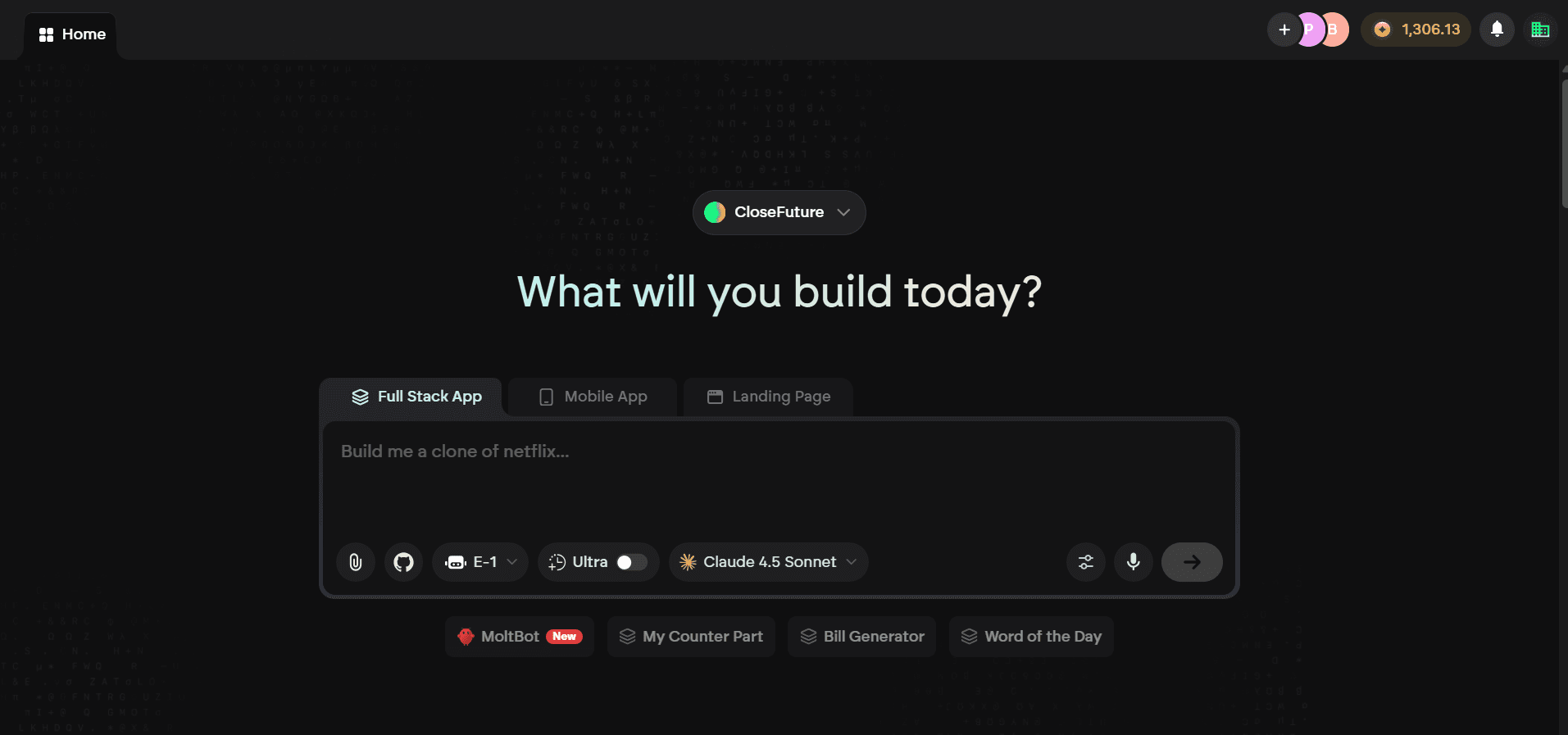
Emergent.sh is a full-stack, AI-native development platform where you describe what you want in natural language, and a coordinated team of specialized AI agents designs, codes, tests, and deploys a production-ready application for you.
It is not a no-code drag-and-drop builder like Wix. It is not a code completion tool like GitHub Copilot. It is not an AI wrapper around a template library.
It generates real, production-grade code across a real tech stack and ships that code to live, containerized cloud infrastructure. The distinction that matters is the word agents , specialized, and coordinated, not a single monolithic model generating code top to bottom.
The Technical Architecture: What's Actually Running Under the Hood
This is where Emergent earns its differentiation, and where most surface-level reviews fall short by treating the platform as a black box.
The Generated Tech Stack
When Emergent builds your app, you are not getting proprietary, locked-in framework code. The platform generates applications using an established, industry-standard stack:
Layer | Technology |
|---|---|
Frontend | React + Next.js (SSR, static generation, component architecture) |
Backend | FastAPI (Python) - high-performance async API framework |
Database | MongoDB - flexible NoSQL document model |
Authentication | Built-in system covering registration, login, sessions, permissions |
Infrastructure | Google Container Registry + Cloud Hosting - containerized and scalable |
This matters enormously. React and Next.js are industry standards. FastAPI is one of the highest-performing Python web frameworks, with native async support and automatic OpenAPI documentation. MongoDB provides the schema flexibility needed when an AI is iterating on your data model in real time.
The practical implication: you can export your code to GitHub, pull it down, and run it locally with standard tooling. There is no proprietary runtime holding you hostage. You own the code.
The Agentic Architecture: Five Specialized Agents, One Build
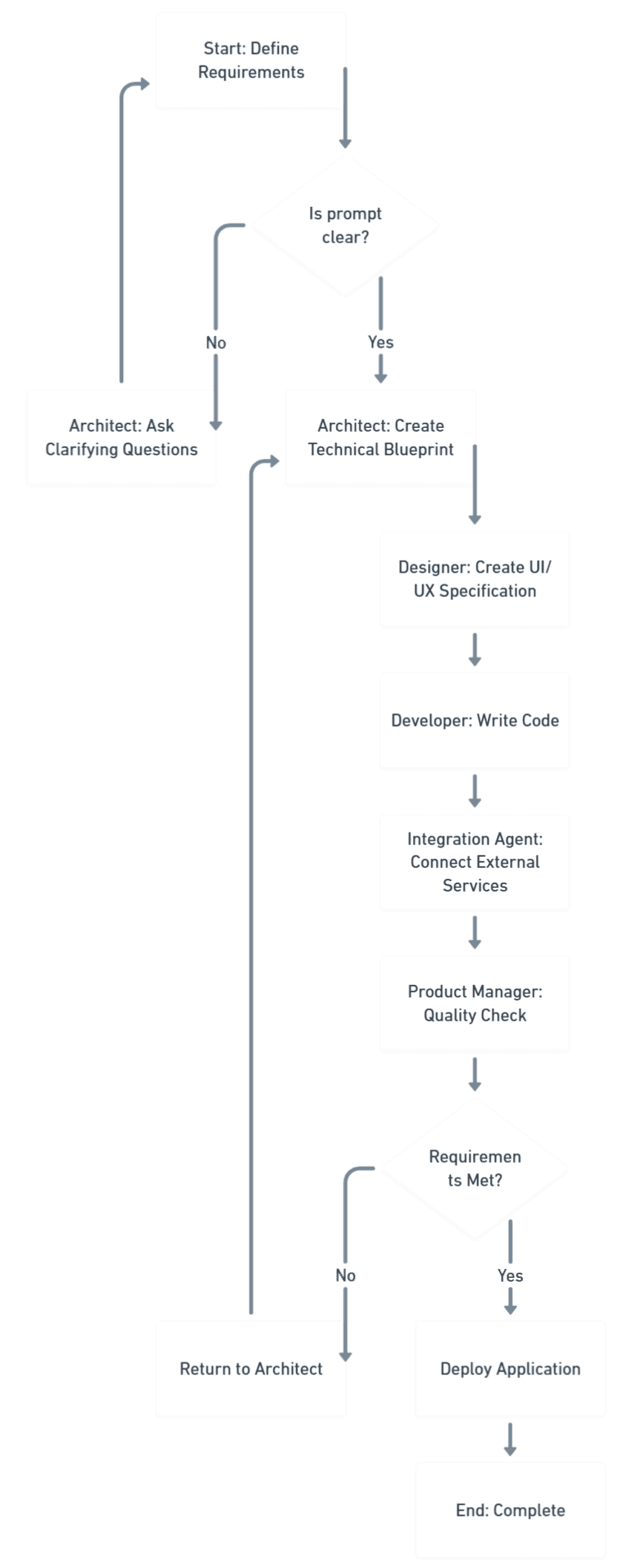
When you submit a prompt to Emergent, you are not talking to a single monolithic AI model. Your request routes through a coordinated team of five specialized AI agents, each responsible for a distinct layer of the development lifecycle.
Architect Agent - The technical lead of the pipeline. Before a single line of code is written, this agent analyzes your prompt, identifies ambiguities, and creates a structured technical blueprint covering data models, API endpoint contracts, page structure, and component hierarchy. If your prompt is underspecified, this is where Emergent asks clarifying questions - exactly like a real developer saying "Should the dashboard update in real time or on page refresh? Do you need user roles?"
Designer Agent - Responsible for the entire UI/UX layer. It generates layout decisions, typography choices, color systems, spacing rules, and responsive breakpoints. It doesn't apply a random template - it reads context. A fintech dashboard, a consumer gaming app, and a medical portal get meaningfully different visual approaches.
Developer Agent - Writes the actual code. Frontend React components, backend FastAPI routes, MongoDB queries, authentication logic, and middleware. It respects the Architect's blueprint and the Designer's spec, and produces real, executable, deployable code - not pseudocode, not scaffolding stubs.
Integration Agent - Connects your application to the external world. Stripe for payments, Slack for notifications, Airtable or Google Sheets as data sources, GitHub for version control. This agent handles OAuth flows, API key management, SDK configuration, and request/response mapping automatically. Critically, the official documentation recommends using Playbooks - pre-tested, verified integration configurations - rather than manual SDK installs, to avoid version compatibility problems.
Product Manager Agent - Coordinates the entire multi-agent workflow, validates that generated outputs meet the original requirements, and runs quality checks before deployment. Think of this as the QA layer ensuring the final product is coherent and complete.
A note on agent counts in other sources: Some third-party analyses describe Emergent as having eight agents by splitting the Developer Agent into separate frontend and backend agents and adding standalone version control, testing, and deployment agents. The official Emergent documentation documents five agents.
The Self-Debugging Loop
One of the most technically impressive features is the autonomous debugging system. When generated code contains errors, Emergent does not surface the error and wait for your input. It detects the issue, analyzes the root cause, generates a fix, and applies it - all without intervention.
To test this deliberately: a prompt was submitted containing a logical conflict - a login page that also needed to handle registration as a separate flow within the same component. The Architect Agent detected the ambiguity, proposed a tabbed UI approach, the Developer Agent implemented it, caught a state management bug in the tab-switching logic, and corrected it. Total elapsed time: approximately 90 seconds. Zero additional input required.
Core Features: What You Can Actually Do
Full-Stack App Generation
The headline capability. You describe an application in plain English and Emergent generates the complete stack - frontend, backend, database schema, API endpoints, and authentication. The output is functional, not a prototype shell.
The range spans eCommerce stores, LMS platforms, real estate listings, CRM dashboards, job boards, medical portals, dating apps, SaaS tools, and more. These aren't starting points - they're fully generated applications ready to deploy immediately.
Custom AI Agents (Pro Plan)
Pro plan users can build and deploy custom AI agents embedded within their applications. These are not simple chatbots. They are context-aware agents capable of:
Querying the application's own database
Triggering backend API endpoints based on user input or scheduled events
Running multi-step automated workflows (example: lead qualification → CRM entry → email notification → calendar invite)
Operating autonomously on schedules or event-based triggers
One documented enterprise use case: a COO at a 4,000-person energy company built and deployed custom agents that replaced work he estimated at "3 to 5 developers, 8 to 12 weeks, and $100,000" - completed in a few hours.
Voice Mode
You can build applications using voice commands. This is a hands-free mode where you speak your requirements, describe features, request changes, or iterate on a design - and the agents respond. It is not a demo-day gimmick. It is genuinely useful during fast brainstorming sessions when typing slows you down.
Forking: Intelligent Context Window Management
Every AI system hits a context window limit. Emergent handles this more gracefully than most.
When your project approaches the context limit (approximately 200,000 tokens on Standard, one million tokens on Pro), you can Fork the task. Forking creates a new branch of your project with a fresh context window while preserving all existing generated code intact. Think of it as a git branch but for AI conversation context - you keep your work, you shed the accumulated token weight.
Other platforms simply break at context limits, generating conflicting or incoherent code as the model starts forgetting earlier parts of your codebase. Emergent acknowledges the limitation and gives you a clean, functional workaround.
Version Rollback
Every state of your project is versioned automatically. If an agent makes a change that breaks something, or if you decide a direction was wrong, you can revert to any previous state in one click. No manual git resets. No wondering what the app looked like before. The entire history is preserved and navigable.
GitHub Integration
Every application generated on Emergent is backed by a real Git repository with a meaningful commit history - not a single dump commit. When you connect your GitHub account:
Every agent action creates a commit with a descriptive message
CI/CD pipeline setup is handled automatically - no YAML wrangling
Code changes you make locally sync back to the Emergent environment bidirectionally
Issue-to-ticket mapping links your GitHub issues to Emergent build states
This is the critical feature for professional developers evaluating Emergent. It answers the question every experienced engineer asks: "But do I actually own the code?"
Yes. Unambiguously yes. Your code lives in your GitHub repository, in standard React, FastAPI, and MongoDB - portable to any hosting environment.
GitHub integration is available on the Standard plan and above. The Free tier does not include it.
Universal Key (Bring Your Own API Key)
Pro plan users can supply their own API keys for major LLM providers:
OpenAI (GPT-4o and successors)
Anthropic (Claude 3.5 Sonnet and successors)
Google (Gemini Pro)
When a Universal Key is active, model usage bills directly to your provider account at your negotiated rates. This is especially valuable for enterprises that already have volume agreements with these providers and don't want to double-pay through platform markup.
MCP (Model Context Protocol)
Emergent has always made API integration straightforward through its built-in Playbooks - predefined, verified configurations for popular services like Stripe, PayPal, Google Auth, GitHub, Supabase, and Airtable. When you say "Integrate Stripe payments" inside the builder, the agents already know exactly what to do.
MCP takes that a step further. With Model Context Protocol support, you can connect any data source to Emergent - including ones Emergent has never seen before.
What an MCP Server actually is: Think of it as a smart adapter. Instead of writing integration code or managing complex API credentials yourself, an MCP server translates your data source into a format Emergent's agents can understand and work with - instantly. No middleware. No custom code.
The difference between the two approaches is clear:
Approach | What it covers |
|---|---|
API Playbooks | Predefined recipes for popular integrations - fast, reliable, but limited to known services |
MCP Servers | Flexible translators that work with any system, including custom or proprietary ones |
What MCP unlocks that Playbooks cannot:
Proprietary or internal systems unique to your organization
Specialized or industry-specific tools
Custom databases or data warehouses
Legacy systems with unique protocols
Brand-new tools the moment they release an MCP server
How to connect an MCP server in Emergent:
MCP configuration is project-specific, giving you full control over which data sources each app can access.
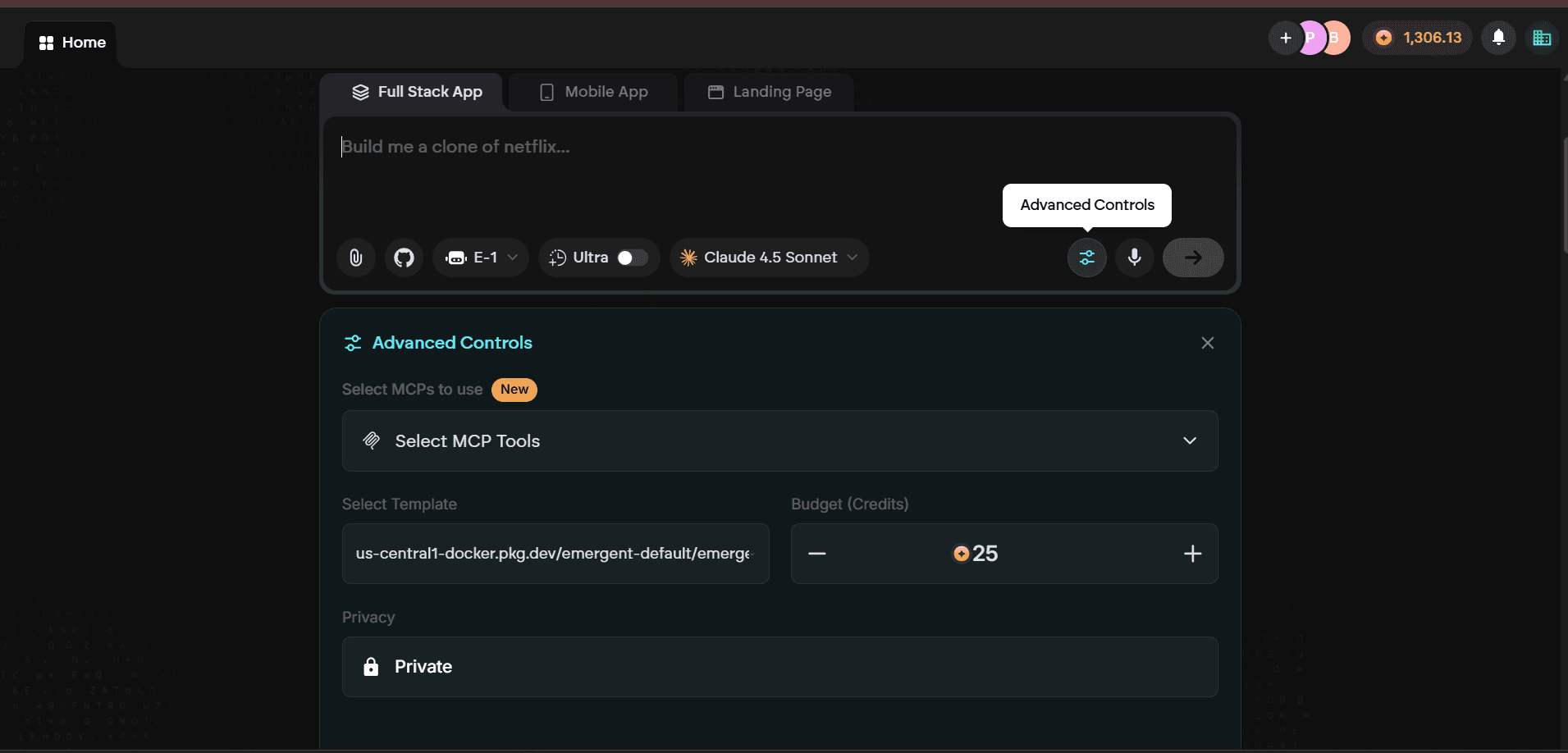
Before starting your project, click Advanced Controls in the project setup screen
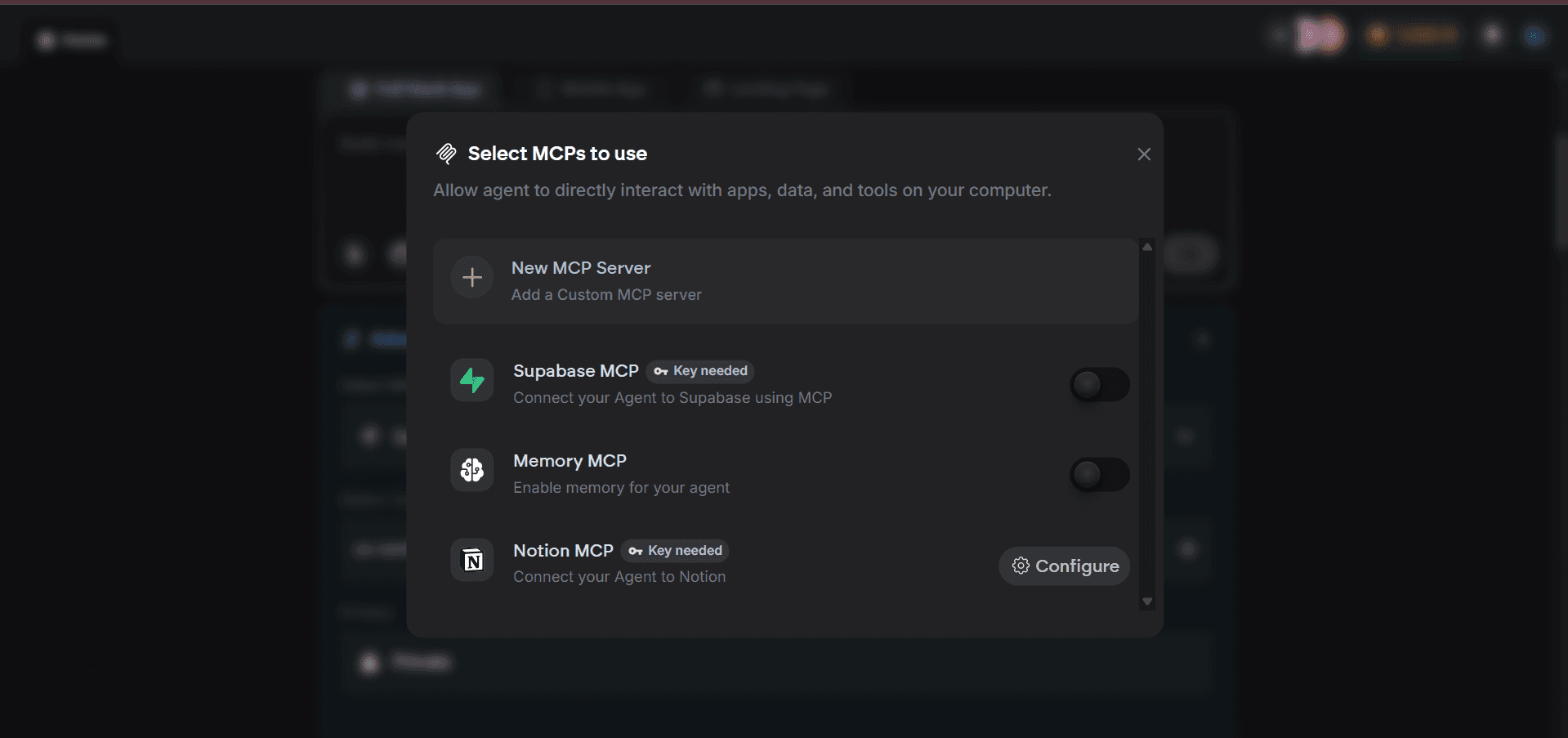
Inside Advanced Controls, click Select MCP Tools to open your MCP configuration panel
Either configure a new MCP server by clicking Configure New MCP - name it, add a description, paste your JSON configuration, and click Verify and Save - or toggle on a previously configured server to reuse it without re-entering credentials
Start your project. Emergent's agents will have access to your connected data sources throughout the entire build process
In short: Playbooks cover what's common. MCP covers everything else. Together they mean there is no external system, database, or API that Emergent cannot integrate with.
The Integration Ecosystem
Emergent connects to applications, APIs, and AI models through its Integration Agent, spanning categories including:
Payments - Stripe, Razorpay
Databases - Airtable, Supabase, MongoDB
Communication - Slack, RingCentral, Google Chat, SMS providers
Scheduling - Acuity, Calendly
Accounting and ERP - QuickBooks
Key implementation note : Use Playbooks for third-party integrations wherever available. Playbooks are verified, pre-tested configurations for common services known to work correctly. Manual integration setup risks SDK version conflicts and undocumented API changes that can be painful to debug.
Pricing: What It Actually Costs
The following figures are verified against the official Emergent documentation as of February 2026.
Plan | Monthly Cost | Credits/Month | Key Features |
|---|---|---|---|
Free | $0 | 10 credits | Core features, web and mobile builds, advanced model access |
Standard | $20/month | 100 credits | Private hosting, GitHub integration, Fork tasks |
Pro | $200/month | 750 credits | 1M token context, Ultra Thinking, custom AI agents, Universal Key, priority support |
Enterprise | Custom | Custom | SSO, RBAC, isolated infrastructure, team workspaces |
Annual discount: 17% off across all paid plans when billed annually.
About the Credit System - The Detail Most People Miss
Subscription credits are provided monthly with no rollover. Unused credits expire at the end of your billing cycle.
Top-up credits purchased additionally cost $10 for 50 credits and never expire. If you have a burst month followed by a quiet one, buying top-ups is smarter than upgrading your plan tier.
One honest caveat: the jump from Standard ($20) to Pro ($200) is steep. There is currently a missing middle tier that serious hobbyists and growing freelancers would benefit from.
Getting Started: Your First App, Step by Step
This is the real workflow - not the marketing demo.
Step 1 - Write a Good Prompt
Go to app.emergent.sh. You'll find a single input field. No setup wizard. No template picker. Just a text box and a blinking cursor.
The quality of what you get out is directly proportional to the quality of what you put in. Here's the difference:
Weak prompt:
"Make a task management app"
Strong prompt:
"Build a project management SaaS app with email and password user authentication, a Kanban board with drag-and-drop task cards, task priority levels of low, medium, and high, due dates, per-project team member lists, and a dashboard showing overdue tasks. Use a dark sidebar with purple accent colors. Include Stripe billing at $10 per month per user."
The Architect Agent handles ambiguity and will ask clarifying questions when needed, but specificity upfront saves credits and eliminates revision cycles.
Step 2 - Watch the Agents Work
After submission, Emergent gives you a live status view showing each agent's progress in real time. Within seconds, code files begin appearing. Within minutes, the architecture is taking shape.
For a medium-complexity application, expect:
Planning phase - approximately 30 seconds
Code generation - 3 to 8 minutes
Quality checks - 1 to 2 minutes
Deployment - 1 to 2 minutes
Total: under 15 minutes to a live URL
Step 3 - Review the Live Preview
Before deployment finalizes, you get a real-time interactive preview. Click through the app, test interactions, and verify the output matches your intent. If something is off - a missing feature, an incorrect layout, a wrong color scheme - type a follow-up prompt directly in the conversation.
This iterative refinement loop is where experienced Emergent users spend most of their time. Treat the first generation as a 90% draft. Follow-up prompts are polish passes, not restarts.
Step 4 - Deploy
One click. Your application receives a live URL on Emergent's hosted infrastructure. Standard and Pro plans support custom domains with automatically provisioned SSL certificates.
Step 5 - Connect GitHub (Do This From Day One)
Connect your GitHub account and Emergent pushes the entire codebase to a repository with a proper commit history. From that point, code changes you make locally sync back to the Emergent environment. This is the bridge between no-code and full-code - and it means you are never locked into the platform.
Real Use Cases: What People Are Actually Building
SaaS Product
Authentication, subscription billing (Stripe), dashboards, user management - the full SaaS stack. Emergent handles this very well because it understands common SaaS patterns deeply.
Internal Tools & Dashboards
Operations teams are using Emergent to build dashboards that connect to Google Sheets, Airtable, or their existing APIs. What used to take a developer a week is done in an afternoon.
AI-Powered Applications
Because Emergent's Integration Agent can connect to any LLM API, you can build AI-native apps - chatbots, document analyzers, content generators - without touching the infrastructure.
E-Commerce
Stripe integration means product listings, cart management, and checkout flows are all handled. Add a Notion or Airtable backend for inventory management and you have a functioning store.
Portfolio & Marketing Sites
The fastest use case. Simple apps deploy in under 5 minutes. Portfolio sites with dark mode, animations, and contact forms are common starting points for new users.
Emergent AI vs Replit vs Lovable — Which Should You Choose?
The rise of AI-powered development platforms has given founders more options than ever. However, choosing between Emergent, Replit, and Lovable isn't always straightforward because each platform is optimized for a different type of user and project.
Rather than asking which platform is "best," it's more useful to ask which platform is best for what you're trying to build.
Factor | Emergent | Replit | Lovable |
Internal Tools | Excellent | Good | Moderate |
Startup MVPs | Good | Excellent | Good |
AI Applications | Good | Excellent | Moderate |
Full-Stack Development | Good | Excellent | Limited |
Non-Technical Users | Good | Excellent | Excellent |
Production Readiness | Good | Excellent | Moderate |
Rapid Prototyping | Good | Excellent | Excellent |
Choose Emergent When...
Emergent is often a strong fit for organizations that want to build operational software, internal systems, and workflow-driven applications quickly.
It's particularly useful when:
business teams need custom tooling
internal processes require automation
speed is more important than extensive customization
Choose Replit When...
Replit offers the most complete development environment of the three.
It is often the better choice for:
SaaS startups
AI-powered applications
production-ready products
long-term software development
Teams that expect their product to grow significantly often appreciate Replit's flexibility and infrastructure capabilities.
Choose Lovable When...
Lovable excels at transforming ideas into working interfaces quickly.
It is best suited for:
prototypes
landing pages
MVP validation
early-stage experiments
For founders with limited technical experience, Lovable can be one of the fastest ways to turn a concept into something tangible.
The Bottom Line
If your goal is internal software and operational workflows, Emergent may be the most natural fit.
If you're building a startup product that will eventually serve customers at scale, Replit often provides the strongest long-term foundation.
If speed of prototyping is your top priority, Lovable remains one of the quickest ways to move from idea to application.
Documented Case Studies
These are published, documented deployments by real organizations - not hypothetical scenarios.
Trilogy 1 Consulting - Transformed a manual audit process into a scalable AI product, measurably reducing costs and accelerating business impact.
Energiezentrale BC - Automated their entire CRM and contract management workflow using Emergent-built tooling.
A UK Energy Provider - Built an AI-powered materials reporting application in two days.
A Leading UK University - Reduced student call wait times by 99% using Emergent-built AI phone agent capabilities.
A Large Energy Company (4,000+ employees) - The COO built a full frontend and backend and pushed to GitHub. He estimated the equivalent work at "3 to 5 developers, 8 to 12 weeks, and $100,000." He completed it in a few hours.
Enterprise: Built for Organizations with Real Requirements
The enterprise offering is not a checkbox feature. It is clearly engineered for organizations with genuine security, compliance, and governance requirements.
SSO Integration - Supports SAML, OAuth, and OpenID Connect. Plug directly into existing identity providers like Okta, Azure AD, or Google Workspace without custom integration work.
Role-Based Access Control (RBAC) - Fine-grained permissions defining who can create, edit, and deploy within shared workspaces.
Isolated Infrastructure - Every enterprise application runs in its own containerized, continuously monitored environment designed for enterprise compliance requirements.
Team Workspaces - Designers, product managers, engineers, and stakeholders co-create in shared environments in real time. This eliminates the "throw it over the wall" handoff pattern that kills velocity in traditional development organizations.
Project Lifecycle Controls - Manage builds from concept through QA staging to production deployment without leaving the platform.
Built-in Monitoring - Real-time tracking of application health, usage metrics, and performance data.
The Honest Assessment: Where It Shines and Where It Has Sharp Edges
Where Emergent Genuinely Excels
Speed of iteration - No comparable platform closes the gap between "I have an idea" and "it's deployed" as fast as Emergent. This is a real, category-defining advantage.
Full-stack completeness - Most AI coding tools generate frontend code and stop. Emergent generates the entire stack - database, API, authentication, payments, and deployment. The output actually runs.
Code ownership via GitHub - Your code lives in a standard, portable format in your own repository. No platform lock-in.
The agentic approach is real - Specialized agents for architecture, design, development, integration, and coordination produce qualitatively better output than single-model sequential tools.
Context management via Forking - Most platforms silently degrade as context windows fill. Emergent gives you a clean, explicit workaround with no lost work.
SWE-Bench ranking - Emergent's coding agents claim the top position on OpenAI's SWE-Bench benchmark, which evaluates AI on real bugs from real open-source repositories. This signals genuine engineering capability at depth.
Where You Will Hit Edges
Context limits still exist - Even with Forking, 200,000 tokens on Standard is a ceiling you will reach on ambitious projects. The Pro plan's one-million-token context window helps but adds significant cost.
MongoDB may not fit every project - If you need relational data with complex joins and foreign key constraints, the NoSQL-first approach creates friction. External database integration would be required.
Prompting is a skill - The platform rewards clear communication. Non-technical users may need time to learn how to describe what they want effectively. "Make it better" is not a prompt. "Make the sidebar navigation highlight the active route with a left border in the brand purple color" is.
The Standard-to-Pro pricing gap is steep - $20 to $200 leaves a missing middle for serious hobbyists and growing freelancers.
Support channels are limited - No live chat or phone support. Help comes through Discord, email tickets, and documentation. Pro users get priority support.
Practical Tips: How to Actually Get Value From Emergent
1. Front-load your specificity. Write a detailed first prompt. Every ambiguity you resolve upfront eliminates a credit-burning revision cycle later.
2. Build in layers, not all at once. Start with core functionality, verify it works, then add authentication, then billing, then integrations. Cramming everything into one prompt creates more surface area for errors.
3. Connect GitHub from day one. Even on prototypes you expect to throw away. It costs nothing additional and gives you a safety net you will thank yourself for.
4. Be specific in follow-up prompts. "The sidebar nav items don't highlight on the active route - add a left border in the brand purple color when a nav item is active" gets you what you want. "The navigation is broken" does not.
5. Use top-up credits for burst usage, not plan upgrades. If you occasionally need more credits than your plan provides, buy top-ups at $10 for 50 credits - which never expire - rather than upgrading your monthly plan.
6. Use Playbooks for integrations. Do not manually configure Stripe, Airtable, or other third-party services from scratch. Playbooks are verified configurations that work. Manual setup introduces SDK version conflicts.
7. Join the Discord. The community is active and experienced users share prompt templates that significantly improve output quality on common use cases.
Link:https://discord.com/invite/X9cqNxYyG8
Quick Reference
Detail | Verified Information |
|---|---|
Founders | Mukund Jha (CEO) and Madhav Jha (CTO) - twin brothers |
Founder Backgrounds | Mukund: ex-CTO of Dunzo. Madhav: PhD Theoretical CS, founding team of Amazon SageMaker |
Backed By | Y Combinator (S24 batch) |
Total Funding | ~$100M (Series A: $23M led by Lightspeed + Series B: $70M) |
Key Investors | Lightspeed, YC, Google AI Futures Fund, Khosla Ventures, SoftBank, Prosus Ventures |
Growth | $15M ARR in 90 days → $50M ARR in 7 months |
Users | 3 million+ across 100+ countries |
Tech Stack | React + Next.js, FastAPI (Python), MongoDB, Google Container Registry |
Agent Architecture | 5 agents: Architect, Designer, Developer, Integration, Product Manager |
SWE-Bench | #1 ranking claimed by Emergent on OpenAI's SWE-Bench benchmark |
Pricing | Free (10 credits) / Standard $20/mo (100 credits) / Pro $200/mo (750 credits) / Enterprise (custom) |
Top-Up Credits | $10 for 50 credits - never expire |
Context Window | Standard: ~200K tokens / Pro: 1 million tokens |
GitHub Integration | Full sync, commit history, CI/CD - Standard plan and above |
Integrations | 10,000+ apps, APIs, and AI models |
Deployment Speed | Simple apps: under 5 min / Complex apps: under 30 min |
Enterprise Features | SSO (SAML/OAuth/OpenID), RBAC, isolated infrastructure, team workspaces |
Prompt:
User Paste a GitHub repo URL → AI analyzes commit history and creates a detective-style "Crime Scene Investigation" board. Detects "code crimes" (giant commits, cryptic messages, 3AM coding). Generates AI crime scene illustrations and a funny mugshot-style developer profile.
Conclusion
It is a genuinely new category of development platform - one where coordinated, specialized AI agents handle the full lifecycle of software creation, from architecture to deployment, while leaving you in full ownership of production-grade, portable code.
Is it perfect? No. Context limits are real. The pricing gap between Standard and Pro leaves a hole for mid-tier users. MongoDB won't be the right fit for every data model. And prompting well is a skill that takes practice "vibe coding" doesn't mean "zero effort coding."
But here's the thing that matters: Emergent collapses the time and cost between having an idea and having a live, working product from weeks or months down to minutes. That is not an incremental improvement. That is a structural shift in who gets to build software and how fast they can do it.
Whether you're building your first app or your fiftieth, Emergent.sh is worth your time. Start with the free tier, write a strong prompt, connect GitHub from day one, and see what comes out the other side.
You might surprise yourself.
CloseFuture brings together design precision, fast development, and startup-focused processes to help turn ideas into real products. If you're looking for a team that understands your vision and can execute it at a world-class level, CloseFuture helps transform your concept into an app users genuinely love.
Ready to start your project?
Book a free consultation with CloseFuture—your trusted partner for building high-performance apps in 2026.
Q1. Do I need to know how to code to use Emergent.sh?
No. Emergent lets you build apps by describing them in plain English or voice. However, clearer prompts usually produce better results.
Q2. Do I own the code generated by Emergent?
Yes. All code is built using open-source technologies like React, Next.js, FastAPI, and MongoDB, and you can export the full codebase to GitHub and run it anywhere.
Q3. Can Emergent be used for production applications?
Yes. Emergent supports cloud deployment, SSL, and custom domains. Enterprise plans also include isolated infrastructure, SSO, RBAC, and monitoring.
Q4. How does Emergent fix bugs in generated code?
Emergent uses an autonomous debugging system that detects errors, analyzes the cause, and automatically applies fixes without requiring manual input.
Q5. How is Emergent different from GitHub Copilot or ChatGPT?
Copilot and ChatGPT assist developers with writing code, while Emergent builds entire applications end-to-end, including architecture, integrations, testing, and deployment.
Q6. Can teams collaborate on Emergent?
Yes. Enterprise plans support team workspaces where members can collaborate in real time with role-based access control.